
Event lead capture
Capture every lead at every event
Trade shows, conferences and networking events are where pipeline starts. Visitors save your card and leave their details, you scan the paper cards and badges you collect on the floor, and every contact is a lead before you leave the venue.
Event lead capture is part of Pro, which starts with a 14-day free trial. See the full comparison.
Trusted by teams across the globe







Why leads go cold after an event
The conversation is the easy part. The hard part is turning forty conversations into forty follow-ups before the details fade.
Without CloudCard
- A stack of paper cards in your bag, sorted a week later
- Notes on your phone that never reach anyone else on your team
- Names typed into a spreadsheet by hand, if they are typed in at all
- A follow-up that starts after the conversation has been forgotten
With CloudCard
- Visitors leave their own details on your card’s lead form
- Paper cards and badges photographed straight into leads
- A voice note on every lead, transcribed for you
- Tags such as “Expo 2025” so each event is easy to filter and follow up
Four ways to capture a lead at an event
Lead form
ProVisitors to your stand open your card and leave their details on its form, straight into your leads.
AI business card scanner
ProHanded a paper card on the event floor? Photograph it and the fields are stored as a lead. No typing, no pile of cards to work through after the show.
AI badge extraction
ProPhotograph a conference or trade show badge and the contact details come straight off the lanyard into your leads.
AI voice notes
ProRecord what you discussed on the way to the next stand. The note is transcribed onto the lead, with suggested tags.
A lead form on your card
When someone opens your CloudCard, one tap on Save Contact adds you to their phone. It also opens a short form, so they can share their own details with you in return.
The form is optional for them, so people who would rather not share can still save your details. Everyone who fills it in becomes a lead the moment they submit it.
- Show your card’s QR code on your stand, your badge or a slide
- Nothing for the visitor to install or sign up for
- Leads appear in your dashboard as soon as they are submitted
- Your admin can switch the lead form on for the whole organisation
Scan paper cards and event badges
Not everyone will scan your code. For the people who hand you a paper card, or wear a badge with their details on it, open the scanner in CloudCard and take a photo. AI reads it and creates a lead with the details filled in.
Because the scanner creates ordinary leads, they share the same dashboard, tags and follow-up as the ones from your lead form.
- Photograph a card or a badge and skip the typing
- Scanned leads sit alongside your lead-form leads
- Part of Pro, with a 14-day free trial
Add the context while it is fresh
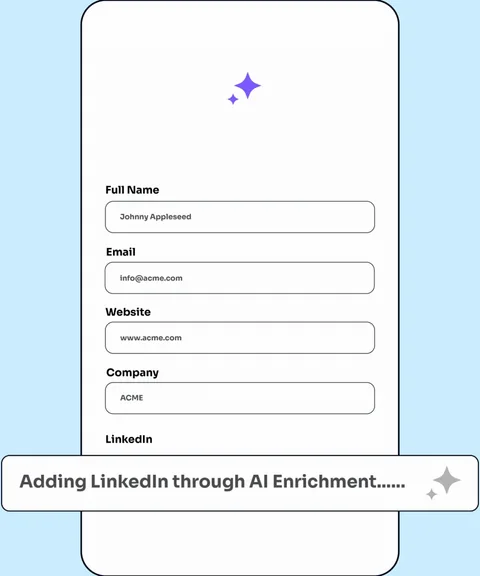
A name and a number only tell half the story. After a conversation, add a note about what you discussed and when to follow up, or record an AI voice note and CloudCard transcribes it onto the lead, with suggested tags.
Notes stay attached to the contact, so a colleague can pick the lead up later with the full picture.
- Follow-up notes on every lead
- AI voice notes, transcribed with suggested tags
- Custom tags such as “Expo 2025” to group leads by event
- The date each lead was captured
After the event: follow up and sync
Filter your leads by an event tag to see who you met at each show, then work through them: score each lead hot, warm or cold, assign follow-ups and track it as a deal.
If your team lives in a CRM, Pro syncs your leads to Salesforce, HubSpot or Zapier, so nothing is copied across by hand.
- Filter by tag to review one event at a time
- Score, tasks and a full timeline on every lead
- Sync to Salesforce, HubSpot or Zapier
- Export your leads to a spreadsheet
From the stand to your CRM in three steps
- 1
Set up your card and lead form
Add your details and a lead form to your CloudCard, then show its QR code on your stand, badge or slide.
- 2
Capture at the event
Visitors open your card and leave their details. You photograph the paper cards and badges you are handed, and record a voice note when you have a moment.
- 3
Follow up while it is fresh
Every contact is already a lead with its own timeline. Score it, assign a follow-up and sync it to Salesforce, HubSpot or Zapier.
You met forty people at the show. Type none of them in.
Photograph the paper cards and badges you collect on the event floor and AI pulls the fields out of each one. Every scan is stored as a lead, ready to follow up while the conversation is still fresh. No pile of cards in a drawer after the show.
Start free trial
Built for the event floor
Halls are loud, the signal is poor and you are on your feet all day. The basics are covered.
Offline mode
A toggle for the conference hall with no reception. Your card still opens.
A QR code for anywhere
Download your QR code and put it on a badge, a stand or a slide.
Wallet pass
Add your card to Apple, Samsung or Google Wallet so it is two taps away.
Tap to share
Add an NFC card, branded to your company, for people who like a physical hand-over.
Capture as a team
Everyone on your stand captures into the same organisation, so leads are shared with the team.
Nothing for visitors to install
Your card opens in their browser, on any phone.
Who it is for
Exhibitors and stand teams
Capture everyone who visits your stand, whether they scan your code or hand you a card.
Sales and business development teams
Give every seller the same capture tools and keep everyone’s leads in one place.
Professionals at conferences
Turn a day of conversations into a list you can act on, without typing it up that evening.
Customer stories
What customers say about capturing leads
“I’ve been using my CloudCard tag for roughly 2 years now and have been impressed from the start. The information it gathers is the valuable info that we often miss out on. What stood out for me most: they listen to their customers and assist and adapt accordingly, and the rate at which this CloudCard app has evolved over the past 24 months.”
“The team at CloudCard were really helpful from the onset. Super responsive to our emails, walked us through an engaging demo, and answered all our questions. We ordered physical business cards too, with the tap functionality, and they work amazingly. We love how easy it is to track our leads, and manage all our info in one place.”
“CloudCard is fast, simple, and highly effective for networking and lead generation. The platform is easy to use internally, and the team is fantastic, always responsive, supportive, and proactive. It adds real value to both our internal operations and our vendor relationships.”
Event lead capture questions
Do visitors need to install an app or create an account?
No. They open your card in their browser and leave their details on the lead form, with nothing to download.
What can the AI scanner read?
Paper business cards and event badges. Photograph one and the AI extracts the contact details into a new lead, so nothing is typed in by hand.
Can I add my own notes after a conversation?
Yes. Record an AI voice note and it is transcribed onto the lead, with suggested tags.
Where do my event leads go?
Into CloudCard’s built-in CRM. On Pro and Premium you can also sync them to Salesforce, HubSpot or Zapier, or export them to a spreadsheet.
Which plan includes event lead capture?
Pro and Premium. Pro starts with a 14-day free trial, so you can try it at your next event.
Can visitors skip the form?
Yes. The form is optional, so someone who would rather not share their details can still save yours to their phone.
Can my whole team capture leads at the same event?
Yes. Everyone on your team has their own CloudCard, and your admin can turn on lead capture for the whole organisation. Give each lead a shared tag, such as the event name, to see all of the event’s leads together.
Keep exploring
A lead captured at an event is only the start. Here's what happens next.
Leave every event with every lead.
Try Pro free for 14 days and capture your first lead, or book a demo to equip your whole events team.